PhotosStyle AI Image Creator

Turn an idea into a finished image

Describe what you want, add reference images, and work with an AI image creator that can organize the details, suggest visual directions, generate results, and refine them with you.

PhotosStyle AI Image Creator workspace showing creative directions and three finished editorial portrait results

An AI image creator built for the whole creative process

A good image rarely begins as a perfect prompt. It may start as a rough campaign idea, a reference photo, a color preference, or a result that is close but still needs work. PhotosStyle Creator gives that unfinished thinking a place to develop. Instead of forcing every detail into one text box, you can explain the goal in natural language, attach images, review the direction, and continue the same conversation until the result feels complete.

Creator combines image understanding, planning, generation, and refinement in one workspace. It keeps the request, references, visual decisions, and generated images together, so you do not have to rebuild context every time you make a change. Use it for a first concept, a set of alternatives, or an ongoing image-editing task where consistency matters across several turns.
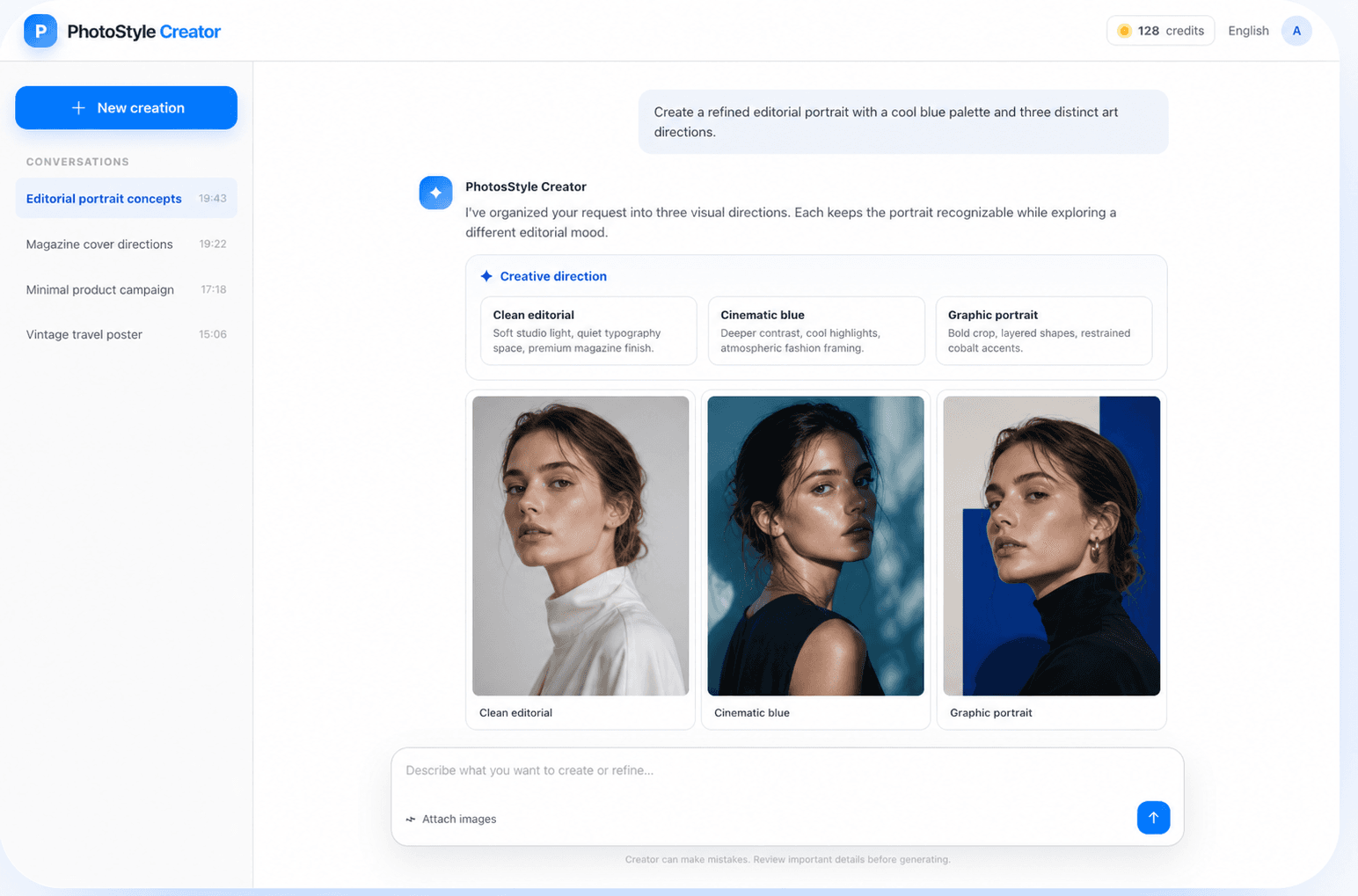
From rough direction to usable visual

The workspace is designed around the decisions people actually make while creating an image—not around a long list of technical controls.

01

Understands ideas and references

Combine a written brief with portraits, products, compositions, colors, or previous results. The agent reviews the available context before proposing what to create, helping visual references and written instructions work together instead of competing with one another.

02

Organizes the creative direction

When a request is broad, Creator can turn it into clearer visual directions such as editorial, cinematic, minimal, or graphic. You can compare the options, answer a focused question, and approve the approach before spending time on full image generation.

03

Generates and refines in context

After the first images are ready, continue with practical feedback: keep the subject, change the lighting, simplify the background, explore another crop, or create a related variation. The conversation preserves the task history so each refinement starts from shared context.

How the AI image agent works

You stay in control of the goal and final choice while Creator coordinates the steps between your idea and the image.

  1. 1

    Describe the outcome

    Start with the purpose of the image, the subject, the mood, or the place where it will be used. A short, honest brief is enough; you can add details later instead of trying to write a flawless prompt at the beginning.

  2. 2

    Attach useful references

    Add images when identity, product shape, composition, style, palette, or an existing result matters. Explain what each reference is for so the agent knows what should be preserved and what can change.

  3. 3

    Review the proposed direction

    Creator may organize the brief, present alternatives, or ask for one missing decision. Review this step before generation to catch misunderstandings early and make the final images more relevant.

  4. 4

    Generate, compare, and refine

    Create the image set, compare the results, download the useful versions, or continue the conversation with precise feedback. Each session stays available in the sidebar so you can return to the correct project later.

What you can create

Creator is flexible enough for exploratory work and structured production. The most effective sessions begin with a clear use case and leave room for iteration.

Editorial portraits and covers

Explore lighting, crop, wardrobe mood, color treatment, and graphic framing for portraits, magazine covers, profile images, and personal brand visuals while keeping the person recognizable.

Product and campaign concepts

Develop product scenes, launch directions, ad concepts, and social campaign imagery. Compare several art directions before choosing one to refine into a consistent final composition.

Posters and storytelling images

Turn a narrative, event, or atmosphere into posters, cinematic scenes, travel-inspired artwork, and visual stories. Use follow-up messages to adjust hierarchy, tone, and focal point.

Reference-led variations

Start from an existing image and ask for related options: a new environment, a different palette, a cleaner layout, or another visual style. State which parts must remain stable to guide safer refinements.

Why use an AI image agent instead of a single prompt box?

A traditional image generator treats each prompt as a mostly separate request. That is useful for quick experiments, but it becomes repetitive when a project needs references, several decisions, and multiple rounds of feedback. An AI image agent adds a working layer around generation: it can interpret the brief, track the session, expose the creative plan, coordinate image tasks, and keep the results connected to the conversation.

This does not remove creative judgment. It makes the judgment easier to apply. You decide what the image is for, what must be preserved, which direction is promising, and when the work is finished. Creator handles more of the coordination so you can spend less time restating context and more time comparing meaningful visual choices.

  • One session keeps the brief, references, decisions, and results together.
  • Visible planning helps you correct the direction before generation.
  • Follow-up requests can build on the current image instead of starting over.
  • Stable session URLs let you refresh, bookmark, and return to the right conversation.

How to get stronger results

You do not need prompt-engineering jargon. A few concrete decisions give the agent better material to work with.

Name the purpose

Say whether the image is a cover, campaign concept, product visual, portrait, poster, or exploration. The intended use changes composition and hierarchy.

Separate must-haves from preferences

Identify the details that cannot change, then describe the parts that are open to interpretation. This is especially important when a person or product must remain recognizable.

Explain reference roles

Tell Creator whether an image is the subject, a style reference, a color reference, or a composition example. Clear roles reduce conflicting instructions.

Refine one decision at a time

Specific feedback such as “keep the pose, make the light softer” is easier to evaluate than changing subject, style, camera, and background in one step.

AI Image Creator FAQ

What is PhotosStyle Creator?+

PhotosStyle Creator is a conversational AI image workspace. It helps turn a brief and optional reference images into an organized creative direction, generated visuals, and follow-up refinements while keeping the project history in one session.

How is Creator different from the AI photo generator?+

The photo generator is useful when you already know what to generate and want a direct tool. Creator is designed for multi-step work: understanding references, clarifying a broad idea, comparing directions, generating images, and continuing from earlier results.

Can I use reference images?+

Yes. You can attach supported image files to help communicate identity, product details, composition, palette, style, or a previous result. Describe what the agent should take from each reference and what it must not change.

Can I return to an earlier creation?+

Yes. Signed-in users can open previous sessions from the conversation sidebar. Each session has its own URL, so refreshing the page or using browser back and forward keeps the selected conversation aligned with the address.

Does the agent make every creative decision?+

No. The agent can organize and execute the process, but you remain responsible for the brief, references, approvals, and final selection. Review important details and generated images before using them in a finished project.

Start with the idea you have now

Bring a sentence, a reference image, or an unfinished visual. PhotosStyle Creator will help you turn it into a clear direction and a finished image.