How to Make a Custom Coloring Book from Photos
PhotosStyle Team
5/10/2026
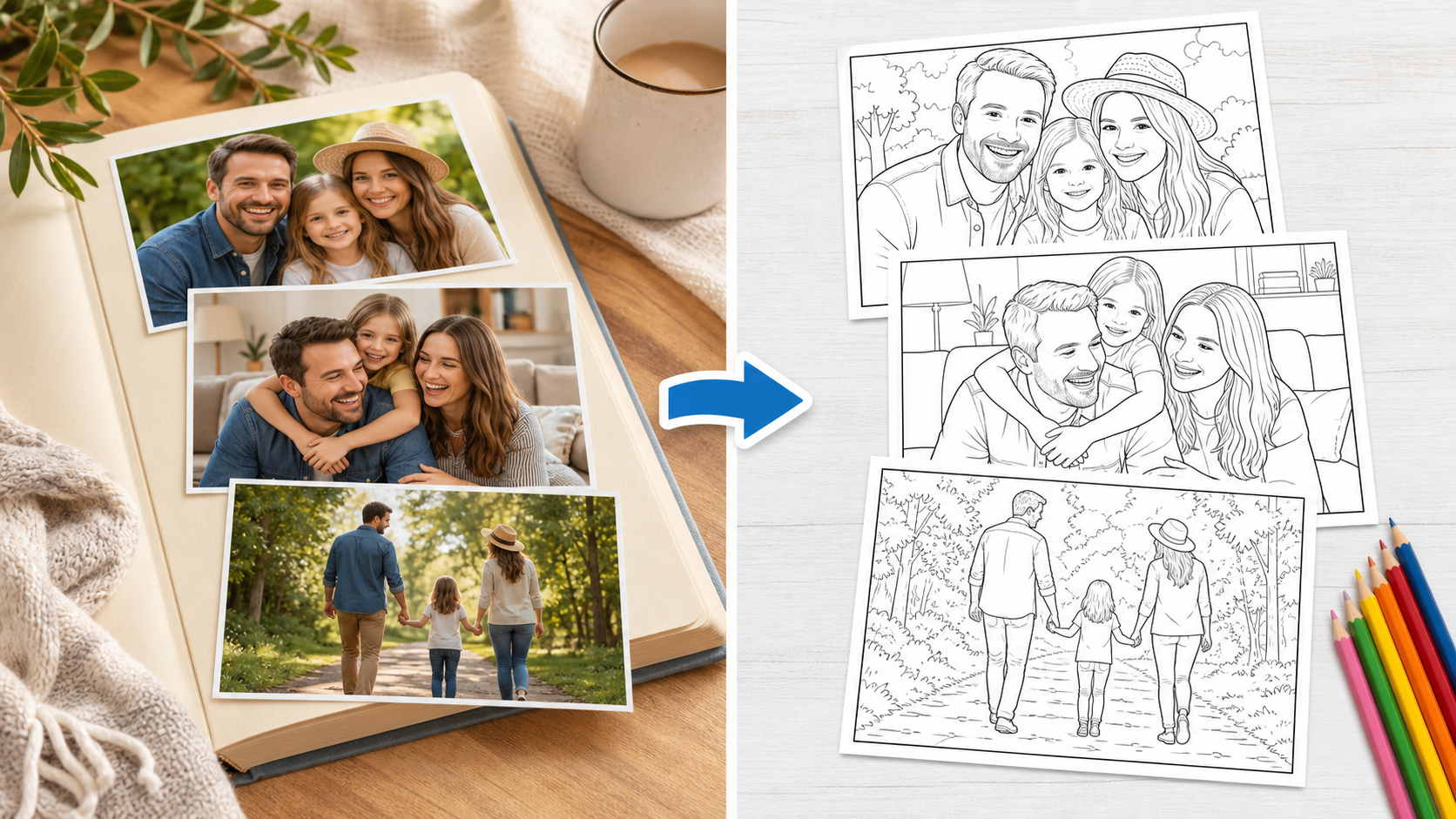
A custom coloring book from photos turns real memories into printable line art pages. Instead of searching for generic coloring sheets, you can use family pictures, pet photos, travel snapshots, classroom moments, product photos, or favorite everyday scenes and convert them into pages that feel personal.
The idea is simple: start with a photo, simplify it into clean black outlines, then print it as a coloring page. With AI, this no longer has to be a slow tracing project. You can create one page for a quick activity or build a full printable book for a birthday, classroom, holiday, reunion, or gift.
Turn Your Photo into a Coloring Page
Example prompt used: "Convert these family photos into clean printable coloring book pages with crisp black outlines, white paper background, and no gray shading."
What is a custom coloring book from photos?
It is a collection of coloring pages made from your own images. Each page starts with a photo, then AI simplifies the scene into black-and-white line art that is easier to print and color.
This works especially well for:
- family activity books
- birthday party pages
- classroom handouts
- pet memory books
- travel keepsakes
- simple printable gifts
- holiday craft packets
- personalized shop inserts
The biggest advantage is emotional relevance. A child may enjoy a dinosaur coloring page, but they may be even more excited to color their own dog, their grandparents, their school project, or a favorite vacation photo. Personal subjects make the activity feel less disposable.
Best photos to use
Start with photos that have one clear subject. A person, pet, house, toy, flower, landmark, or object usually converts better than a busy crowd scene. The AI needs visible edges to decide which lines should remain in the coloring page.
Good source photos usually have:
- clear lighting
- visible subject edges
- simple backgrounds
- high enough resolution
- natural contrast between the subject and background
- faces or objects that are not too tiny in the frame
Avoid dark, blurry, or crowded photos when the coloring page needs to be easy for children. A large group photo at night may look meaningful as a memory, but it can become too dense as line art. When in doubt, crop closer to the main person, pet, or object before uploading.
Step-by-step: upload, convert, review, print
- Choose your strongest photo.
- Open Photo to Coloring Page.
- Upload the image.
- Generate the coloring page.
- Review the line thickness and subject clarity.
- Download the result and print it on plain white paper.
For a full book, repeat the process with a consistent photo style. Similar framing and lighting help the final pages feel like one set. For example, a book made from ten close-up family portraits will feel more polished than a mix of distant group shots, dark indoor photos, and cluttered screenshots.
Prompt tips for better coloring pages
If you can add a prompt, describe the print result you want. The best coloring page prompts are practical, not overly artistic. Ask for clean outlines, a white background, and enough open space for coloring.
Try prompt phrases like:
- clean printable coloring book page
- crisp black outlines
- white background
- no gray shading
- large open areas for coloring
- simple kid-friendly line art
- preserve the main subject
- remove background clutter
For younger children, ask for thicker outlines and fewer details. For older kids or adults, you can keep more texture in clothing, fur, leaves, buildings, or decorative objects.
How many pages should a custom coloring book have?
For a quick activity, 3 to 5 pages is enough. For a birthday table, 6 to 10 pages gives children variety without requiring too much prep. For a printable gift or memory book, 12 to 20 pages feels more complete.
A simple structure can help:
- cover page with the title
- 3 to 5 people or pet pages
- 3 to 5 place or event pages
- 2 to 4 detail pages, such as toys, flowers, food, or decorations
- one blank page for drawing
You do not need design software to start. Print the pages, stack them in a simple order, and staple them. If you want a more finished gift, add a cover sheet and use heavier paper.
How to make multiple pages faster
If you want a full pack or book, converting photos one by one can become slow. Use batch conversion to apply the coloring page style to several photos in the same flow.
Create Multiple Coloring Pages
Batch conversion is useful when you need:
- a 10-page family coloring book
- a pet coloring page pack
- classroom worksheet sets
- party activity pages
- printable bundles for a shop or event
- memory books from a vacation or school year
After batch generation, review the full set and remove any page that looks too busy. A tighter final set is better than a larger book with several confusing pages.
Printing tips
Use white paper, choose portrait or square layouts consistently, and keep fine details moderate. For younger children, simpler pages with larger spaces are usually better. For adults, detailed pages can be more relaxing and expressive.
Before printing a full set, test one page first. If the lines are too dense, try a simpler photo or crop closer to the main subject. If the lines are too light, generate again with a prompt that asks for bolder outlines.
Crayons work well on regular printer paper. Colored pencils are good for detailed pages. If children will use markers, choose thicker paper so the ink does not bleed through.
FAQ
Can I make a coloring book from phone photos?
Yes. Phone photos work well as long as they are clear and bright. Portrait mode photos can be especially useful because the subject is separated from the background.
Do I need to edit the photo first?
Not always, but cropping helps. Remove extra background space and keep the subject large in the frame. You can also brighten a dark photo before converting it.
Can I sell a custom coloring book made from photos?
You should only use photos you own or have permission to use, especially for commercial projects. For personal family books, your own photos are usually the safest starting point.
What if the result has too many lines?
Use a simpler photo, crop closer, or prompt the AI to create a simple coloring page with open spaces and no shading.
Start with one page
The fastest way to validate the idea is to convert one favorite photo first. Once you like the result, build the rest of the book as a pack.